Best Accel
Best Accel finds your best 0-60 / 40-80 / 60-100 / 0-100 km/h times (or 0-30 / 30-50 / 50-70 / 0-60 mph) in every drive log — automatically. There's no timer to start: just look back after the drive and see the best acceleration hiding in your everyday driving.
1.What is Best Accel?
- It analyzes a drive log after the fact and shows the fastest time for each of four speed ranges
- There is no start button or countdown. Focus on driving, then see the results when you open the drive log (the same idea as Virtual Dyno)
- Times, the map view and image sharing are free. Personal bests per vehicle (New Best!) are a Premium feature
※ We don't recommend driving on public roads to set times. Always obey traffic laws
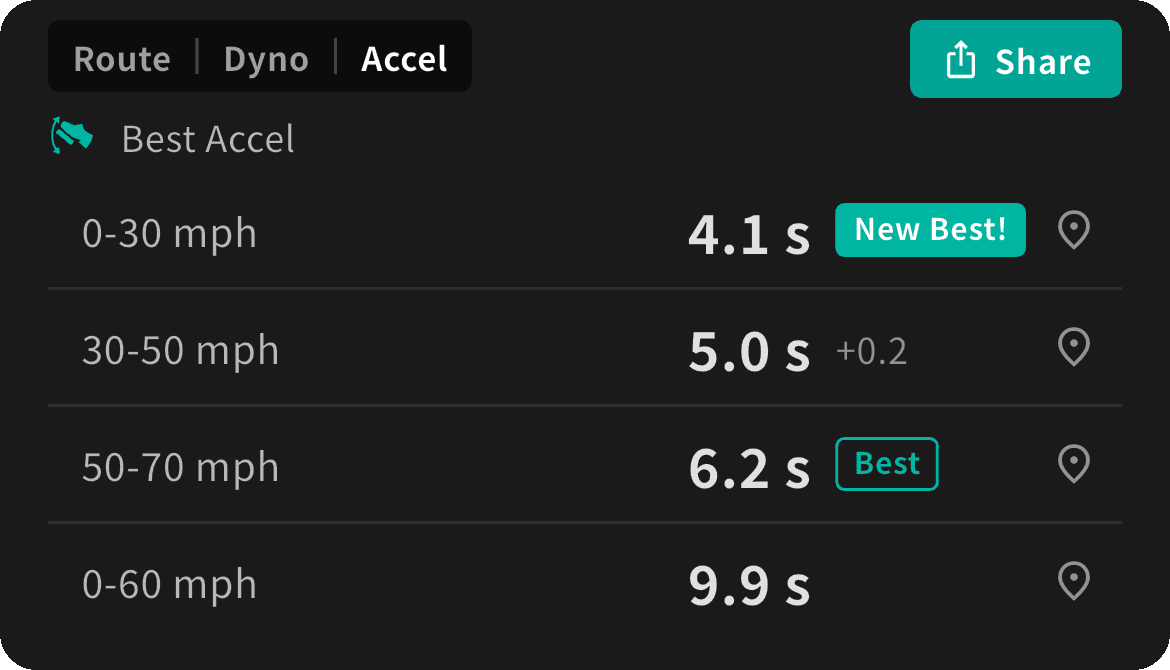
2.How to read it
- In a drive log's details, switch the map block (top left) to "Accel" (Route / Dyno / Accel)
- The four ranges are listed:
| Range (km/h) | Range (mph) | Typical situation |
|---|---|---|
| 0-60 km/h | 0-30 mph | Pulling away from a stop |
| 40-80 km/h | 30-50 mph | Merging or overtaking |
| 60-100 km/h | 50-70 mph | Joining a highway |
| 0-100 km/h | 0-60 mph | From a stop to highway speed |
- A range shows "--" when the drive had no matching acceleration. 0-100 km/h (0-60 mph) is often "--", and that's normal
- Units follow the speed slot on the playback screen or dashboard; if neither has one, your device region decides (mph in the US, UK and a few others)
3.See where it happened
- Tap a time to switch to Route: just that section is drawn as a thick colored line, with a dot at the start and a flag at the finish
- Tap "×" on the chip at the top right to go back to the whole route
- If no GPS route was recorded for that section (in a tunnel, for example), a message is shown instead
4.Personal bests (Premium)
- Best times are kept per vehicle profile and per range
- A new best shows "New Best!" with a sound. When you open older drives, you'll see "Best" if that drive holds the record, or the gap to your best (e.g. +0.4)
- Bests are counted by the vehicle profile used when the drive was recorded, so another car's drives never mix in
- Older drives without vehicle profile information (recorded before v1.3.0) are not counted
- If you delete the drive that holds a best, that best is removed; it builds up again as you open other drives
- km/h and mph bests are kept separately
5.Sharing as an image
- Use the share button at the top right to turn the four times into an image for social media
- The image shows the vehicle name, date, the four times, best marks (Premium), the logo, and a note that the times are estimated from recorded data
- Place names, the route and the drive log's name are never included
- Enter the vehicle name under "Vehicle info for power calibration" in your vehicle profile (Premium; "--" on the free plan)
6.How it works and accuracy
- Speed comes from the ECU (OBD2 vehicle speed, PID 0x0D). GPS speed is not used
- Drive logs hold 1–2 samples per second, so the start and finish of each range are interpolated. Expect about ±0.3–0.5 s of error; times can differ from 10 Hz GPS timers
- "0" means the ECU speed reads 0. The moment of pulling away is estimated from the first two samples after moving
- Sections are skipped if speed drops by more than 3 km/h on the way, data is missing for 3 s or more, or the run takes 60 s or longer
- ECU speed can differ slightly from your speedometer, which usually reads a little high
7.Desktop app
- Desktop v1.0.21 and later show Best Accel in the drive log's map block too (personal bests are mobile only)
- When a drive is trimmed to match a video, Best Accel (and Virtual Dyno) analyze only that range — which is why the times can differ from the mobile app
8.FAQ
Everything shows "--".
Drives without OBD2 vehicle speed (such as GPS Chime Mode drives) can't be analyzed. Ranges with no matching acceleration also show "--"
The times don't match my timer.
Times are estimated from 1–2 samples per second, so there is about ±0.3–0.5 s of error. Enjoy them as a look back at your drive
I never see New Best!
Personal bests are a Premium feature, counted per vehicle profile at recording time. Older drives without profile information are not counted
Is it free?
Times, the map view and sharing are free. Personal bests are Premium
Download OBD NINJA
Free on iOS and Android.